 MindustryToolv20260213.08.31
World processor are processor that controls how the world behave, they have every instruction a normal processor have plus world instruction
They have unlimited range
They can link and control every buildings including enemy’s
they can bind and control every units including enemy’s
Maximum IPT of a world processor is 500, which can be set using Set Rate
World processor are editor only object, go to the editor - choose a map - at the top left there is a hamburger button, click on it and go to “Edit In-Game”  , world processor along with world cell and world message will appear in the processor menu, however this mode is equivalent to pause mode as nothing runs including processors, go back to the editor open the hamburger button and choose “Playtest”
  instead, this allows you to edit and run processor in real time, although not placing new ones
alternatively you can load your custom map as normal through the “Play” button and use the console to make world processor available, typing :Blocks.worldProcessor.buildVisibility = BuildVisibility.shown will make world processor available in the menu, andVars.state.playtestingMap=Vars.state.map allows you to edit them (making the map into a playtest mode), we are basically doing the same thing as the former method but using the console instead, however when you exit out of the world the game thinks you are in the editor thus putting you in the editor without saving any changes, auto save does work though, so you might want to lower the auto save interval, or you can disable the playtest mode using :Vars.state.playtestingMap=null before exiting the world
there might be better ways of gaining access to world processor, like using mods, if you know any other easier method let me know and i will edit this section
Get block
Get tile information at the specified coordinates
result the outputget what to get, can be:
floor get the floor name of the specified coordinate
ore get the ore name of the specified coordinate
block get the block name of the specified coordinate
buildingatSet Block
Set tile at the specified coordinates
set what type to set, can be :
floor set the floor to the specified name and Coordinate
ore set ore to the specified name and coordinate
block set block to the specified name and coordinateto what tile to set, content name, name can be found on Environmentat x and y coordinate respectivelyteam what team to set the block to, can be team name or a number 0 - 255
Spawn Unit
spawn a unit at the specified coordinates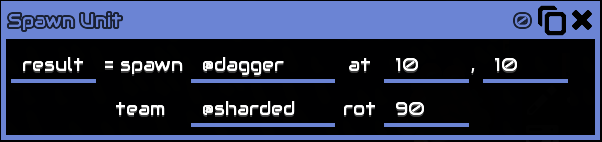
result, the output, unit referencespawn what unit to spawn, content name, name can be found on Unitsat x and y coordinate respectivelyteam what team the unit spawned belong to, can be team name or a number 0 - 255rot rotation, which direction the unit is facing when spawned, in degrees, for reference : 360/0 is right, 90 is up
Apply Status
apply a status effect to a unit
apply or clear, whether apply or clear the status effectwet what status to apply to the unitto unit, unit referencefor duration of the status
Spawn Wave TO ADD#2
Set Rule
set the game rule, this is the same as the game setting in the map editor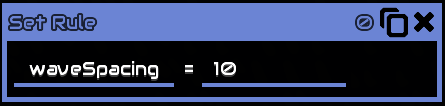 currentWaveTime
change the current wave timer, in seconds
waveTimer
TO ADD#3
waves
TO ADD#4
wave
set wave number
waveSpacing
change the timer for the next wave, in seconds
waveSending
TO ADD#5
attackMode
TO ADD#6
enemyCoreBuildRadius
set how large the radius of the no build zone around the enemy core
dropZoneRadius
set how large the annihilation radius around the enemy spawn point
unitCap
set the cap of unit that can be constructed
mapArea
set the size of the playable field in the map/sector
starts at the bottom leftx and y is the offset from 0,0width and height is the size of the map, calculated from the offset
lightning
boolean, whether to enable lightning or not, if disabled all section of the map (other solid walls) will be fully bright
ambientLight
set the ‘dark’ part of light colors, in other words change colors of shadows
solarMultiplier
set the multiplier solar panels produce power
unitBuildSpeed
set the build speed of units
unitHealth
set the multiplier of unit health, does not actually change unit max health, increase resistance instead, actual damage received = (damage received / unitHealth) as for ‘damage received’ check damage calculation
unitCost
set multiplier of unit construction cost
unitDamage
set the multiplier of unit damage
blockHealth
set the multiplier of block health
blockDamage
set the multiplier of block damage (turrets, explosion, etc)
rtsMinWeight
TO ADD#7
rtsMinSquad
TO ADD#8
Flush Message
display a message on player’s screen from the text buffer, will wait until the previous message finishes
announce center of the screen
notify top of the screen
toast
mission
Cutscene
manipulate the camera, players cannot move/interact in this mode
does not have duration cutscene will stays until cutscene stop is usedpan moves the camera to the specified coordinates, with specified speedzoom zooms the camera, value is from 0 to 1, although can be more it is limited by the game, this limit is the same as your manual zoom limit, when used not with pan will zoom to 0,0 insteadstop stops previous cutscene
Effect
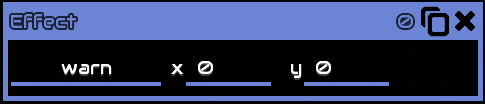 display a particle effect on the world, you can click the
 warn to view every available effect
TO ADD#9
Explosion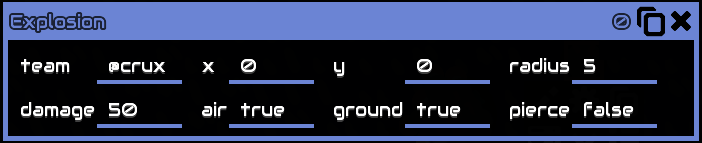 create an explosion
team what team the explosion belong to, explosion cannot harm ally blocksx y where to create the explosionradius size of explosion, block outside this radius does not take damagedamage the damage of the explosionair whether to damage air or nor, true means it will damage air (air units, boosted units, etc)ground whether to damage ground or nor, true means it will damage ground (ground unit, blocks, etc)pierce whether to pierce buildings or not, if false, it will need a line of sight from the explosion to the block, if something is in the way that block will not be damaged
Set Rate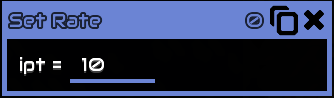 Set the speed of the processor, in instruction per tick, 1 second = 60 ticks
Fetch
get unit/player/core/building and output their reference to result, by index
or unitCount/playerCount/coreCount/buildCount
which gets their respective total count (alive/exist) in the map
team what team to fetch the object, content name, eg. @sharded# index, starts at 0, 0 being the first object
when an object dies the last object index will replace the object index that dies
for example: you have 10 conveyors indexed from 1-10, conveyor #5 is deconstructed, conveyor
#10 will the become #5, then a new placed conveyor will become #10
Sync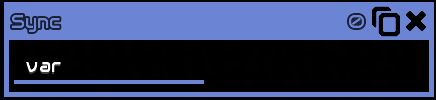 sync a variable across all devices, used mainly in multiplayer, to avoid desyncing
Set Flag set a global flag / global variable, flag content can only be 0 or 1, true or false
flag name is enclosed by "
this flag can be read anywhere in the map using the get flag instruction
Get Flag read the flag/variable created by set flag
reads the content of the flag
writes the result the the result variable
Set Prop sets the properties of a unit or building
of unit/building Reference
to value
TO ADD#10